Frequency changes to all wireless mic systems in the 600Mhz range in Canada


Overview


Whether you are using a wireless microphone in a sanctuary, an aerobics class, or in a karaoke system in your basement, most of the professional and semi-professional systems are in the 600Mhz range of frequencies – generally from 614-698 Mhz. These wireless microphone systems are called ‘UHF’ systems. Users of these UHF systems generally have excellent quality sound, and lack of dead spots.

More importantly, users of these wireless microphone systems have not had to pay a licensing fee which is typically the case with other types of wireless systems. Fast food restaurants, for example, pay a $600 a year licensing fee to ensure no other wireless systems affect their given frequency set.

With the license-free systems, most are multi-channel frequency systems.   This means that if interference does affect one frequency set, the end user of the microphone can simply change frequencies to an interference-free channel, and continue using the system without issue.


Frequency Change as of 2018


In 2017, we learned that the 600Mhz frequency set was to be auctioned off to cellular phone companies in the US, and that a wholesale frequency change was to happen throughout the US some time in 2019. We at Sound Solutions contacted all of our Canadian distributors in an effort to determine if Canada was to be affected. Unfortunately, at that time, none of the suppliers could offer us an answer, as nothing had been announced for all provinces.

In spring of 2018, we confirmed that Canada would be affected by this frequency change, and that the 600Mhz set of frequencies was also going to be auctioned off to cellular companies needing more bandwidth.


In North America, the new frequency set was to be in the 500Mhz frequency range, which would continue to offer similar range and fidelity with no dead spots. The problem however,  is that it is not economically feasible to do change frequency in an existing wireless mic.  While some companies offered a trade-in for the older 600 Mhz systems, it appears that most clients will continue using the 600Mhz systems until they reach end of life.


When is the frequency change taking place?


As of November of 2018, suppliers and dealers were no longer selling the 600Mhz wireless microphone systems.  In fact, all parts short of the microphone elements were quickly discontinued by all suppliers, and all new systems sold are in the 500 Mhz range.


How do I know if I have an affected 600Mhz wireless microphone?


All wireless mic systems have an identifying sticker on both the receiver and transmitter units. Many manufacturers will state the range of frequencies on the units, along with the serial number. These stickers are usually on the backs of the units, on the bottom of the receivers, or within the battery compartment of the transmitter.

Receiver

On the receiver, look for a sticker on the back or the front.


Handheld

On a handheld transmitter, look for a sticker inside the battery compartment or a label near the display.


Bodypack

On a bodypack, look for a label on the front or for a sticker on the back near the belt clip.


Other manufacturers will use   some identifying mark on the receiver/transmitter units, without actually stating the frequency. If that’s the case,  do not hesitate to give us a call, and we’ll help you identify the frequency.


How long can I use my older 600Mhz system?


The time at which interference will hit the older 600Mhz series of wireless microphones will depend on how quickly the new cellular towers will be built in your area. While the 600Mhz towers will not be in use until late 2020  or early 2021, testing of these towers may occur prior to that time. Our understanding is that as of this writing (Sept 2019), Calgary is already experiencing some interference as new towers are being constructed. When our clients in the BC area will be affected is anyone’s guess, but technically, it will be ‘illegal’ to use  at some point in either 2020 or 2021. The information available online varies from site to site.


Will the government come knocking on the door of your church or fitness facility?   Will tinted window vans full of men in black  sweep the neighborhood looking for people breaking the law? No, of course not! Keep in mind that your very low power battery operated wireless mic has a range of about 100m, whereas the much larger cellular towers have a range in the multiple Kms. The chances of your wireless mic affecting your next door neighbor’s cellular phone operation is slim to none, however these large towers will cause issues with your wireless mic system.


What will the cell tower interference sound like in my wireless mic system?


Well, that is most certainly the $1,000,000 question! We’ve asked several suppliers this exact question, and have received varying responses ranging from  “it will cut out intermittently” to “you’ll hear tones through your sound system” among others.


So.. now what? I still have a 600Mhz wireless mic system that I bought in 2017!


Here is our recommendation:  For the time being, if your 600Mhz wireless mic system is working fine and is interference free, continue to use it. We find that the lifespan of a heavily used fitness headset system is between 3-6 years, and in a less used church handheld microphone system, the lifespan can be 10+ years. Continue using your existing wireless mic system until such time that you experience problems with it. Understand that replacement receivers and transmitters are no longer available for the 600Mhz range, so once a unit stops working or is physically damaged, you’ll need to replace the entire system.

Note that the new 500Mhz wireless mic systems physically will look identical to their 600Mhz counterparts, so you can save the old system for spare parts, including windscreens, battery covers, knobs, etc if you so choose to. Some suppliers, including Sound Solutions, are offering some trade-in value on older 600Mhz systems,  so call us to find out!


Additional Reading


For those so inclined, here’s additional links with more technical information regarding the 600Mhz frequency range:


https://www.ic.gc.ca/eic/site/smt-gst.nsf/eng/sf11342.html#s7

https://www.fcc.gov/wireless/bureau-divisions/mobility-division/wireless-microphones (US gov’t link, almost all information applies to Canada as well save for the time lines, add about a year to every date given in this link)

http://www.sfm.ca/pro-audio/update-on-the-600-mhz-spectrum-in-canada/


Audio Preventative Maintenance for Audio & Video Systems

Preventative Maintenance for Audio Systems

We have recently received a number of service calls with respect to sound systems which are all related to preventative maintenance, so we thought we’d share a few of our expert tips on how to keep your audio and video systems running as long as possible. There is simply nothing worse than hosting a large function at your facility, only to discover that the sound system is not  operational for a standing-room only crowd. While some contractors offer 24-hour support, the travel time involved may make it far too late for the tech to be of any useful assistance. Let’s look at some basic maintenance tips to keep your systems in top shape.

Keep your sound system in top shape:

  • Use a jet of compressed air to clean out air vents on sound equipment
  • Clean dust bunnies from around the audio/video system
  • Rotate volume and tone controls every 6 to 12 months to keep them lubricated
  • Leave equipment on 24/7
  • Get an annual check-up of your equipment from a sound contractor

Lifespan of a typical audio/video system

Remember when you got your TV repaired? Of course you don’t.

Back in the day, we simply advised that a piece of equipment was not worth repairing. Currently, we use the catch phrase “end of life cycle” or “built-in obsolescence” because now most equipment is designed to be disposable. Most audio manufacturing companies historically put forth claims such as “17 years mean time between failures”, but all have long since quietly dropped these sentiments as the equipment they are manufacturing no longer will perform reliably for 17 years. This applies across the board to all manufacturers – not just the no-name brand ones.  When was the last time you took your television to a TV repair store to get serviced? These days, you simply throw it out and purchase a new one.  Sadly, the same can hold true for sound and video systems.

Don`t let your sound system become public art

From our experience, a typical commercial sound system will last no more than 15 years before problems start creeping in due to component aging.  That is assuming that the sound system is properly designed, is well ventilated, and that name brand equipment is being used. Sound systems that are poorly ventilated, or located in a closed closet can see that longevity number drop to under half.

Failures due to Heat

While the days of a smoke-filled environment are long gone, the large metal heat sinks that keep an amplifier cool are also long gone.  Todays’ amplifiers use small heat sinks, and rely on fans to keep cool. Even in a relatively clean office environment, an amplifier can gather a lot of dust.  This heats up the internal components quickly, resulting in damage that can exceed the cost of a new unit. 

A neglected amplifier at five years. All that dust and dirt leads to overheating and serious damage

While we do not recommend that anyone open their amplifiers to clean them, a jet of compressed air into the vent slots of the front of an amplifier can certainly clean off the serious accumulation of dust and dirt seen above. We recently completed a service call to an arena that advised that the sound cut out after the system had been used for about an hour. We discovered an even worse scenario than the above picture. We had installed the two amplifiers 17 years ago, but they had never even once been serviced.  One amplifier was beyond repair due to the heat damage, but the second was cleaned and is still working today.

Also, it is very important to remove dust bunnies from around the amplifier rack. This prevents the fans from sucking in more dust, which then results in  more build up inside the amplifier chassis.

Noisy controls/system cutting out

A non-technical fix to cure some common problems of intermittent sound systems is to rotate the volume controls and switches every 6 months from one end to the other. This prevents oxidation from building up, and ensures the lubrication within the controls remains fluid. It is usually that one signal input (such as a wireless mic) that is only used once a year for a large function that will inevitably fail on the day it’s needed. Working the controls can prevent this experience. Note that we do not recommend removing any security covers that may be covering sensitive settings.  In addition, do not forget to rotate the volume controls that may be in a penalty box or on a pool deck.

Call a professional and have your sound system running clear and distortion free

Once a volume control starts cutting out, or changes from soft to FULL volume when moved slightly, a technician will need to be called to replace or to clean the control internally.

Keep it turned on, or turn it off?

We are frequently asked for advice about whether it is preferable to turn a sound system off at night, or at any time when it is not being used. With everyone concentrating on energy savings, it’s a good question. It’s a two-part answer:

Most sound equipment draws a negligible amount of power when idling, so we recommend that mixers, amplifiers and signal processing equipment be left on 24/7 for a number of reasons:

  • You won’t see the difference on your power bill if you turn off even a large arena sound system nightly.
  •  Just like an incandescent bulb will burn out when you turn it on, so will an amplifier. The surge of power rushing into the amplifier at turn-on is hard on equipment. Leave the equipment on so that it remains at a constant temperature, as this practice lengthens the life of electronic components.

The exception to leaving sound equipment on continually are CD or MP3 players, laptop computers  that act as music sources, and (gasp!) cassette decks – IF anyone is still using them. All of these music sources use components such as lasers or motors that have a finite life to them. Turning these devices off until they are needed will extend their life significantly.

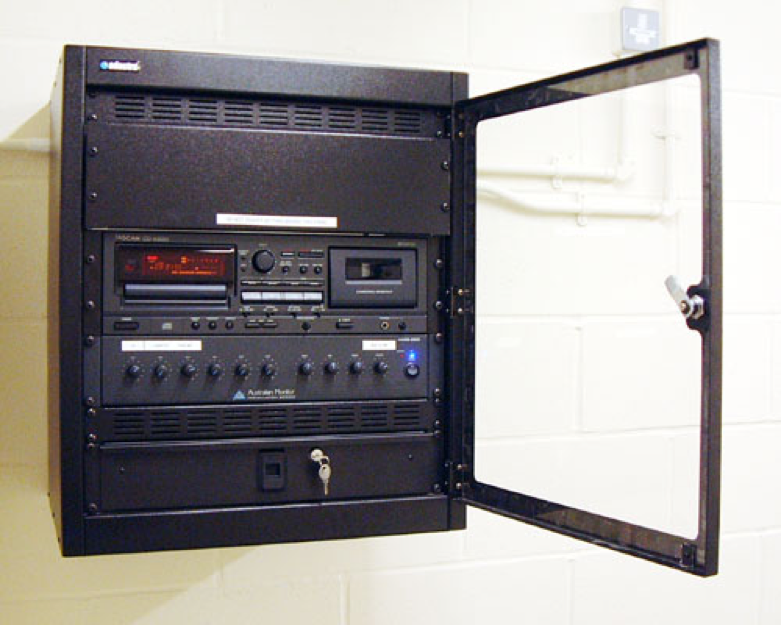
Turn your CD/MP3/Cassette deck off when not in use

Call your sound contractor for a yearly check-up

While the above tips will extend the life of your sound system, there’s nothing like calling in a professional technician to run through all of your audio and video systems completely. We were recently requested to check a sound system that we had installed 15 years ago. When our tech arrived on site, he noticed that there was a lot of hissssss in the sound system which had not been mentioned when we were initially contacted. Our tech diagnosed that one of the components in the sound rack was defective and was able to bypass it, ensuring that the sound quality was excellent for the upcoming high school graduation ceremonies. This was a case where only a tech familiar with sound equipment could have resolved the issue, and averted a potential audio disaster!

It is a wise choice to have a qualified audio contractor check your entire sound system over at least once every year. Think of it as being the oil change that keeps your system running smoothly. A skilled tech can pinpoint and diagnose potential problems that may not be apparent to end users.

End of Life

The expected life span of a well-designed and installed sound system is about 15 years. The exception is your music sources, which typically last two to three years for a CD/MP3 player.  This time frame is even less if used in a pool environment where chlorine can and will attack mechanisms, laser assemblies and microphone jacks that are typically abused in an arena or aquatic setting.

Here`s an example of a 6 year old set of microphone connectors, well chlorinated on a pool deck

On the positive side, the speakers in a commercial environment should last well in excess of 20 years.  This of course is providing that the sound system is designed so that the speakers cannot be damaged regardless of how loud the volume is turned up, and secondly, as long as the correct speakers are specified at the time of the installation

What won’t increase the life of your sound system

We’ve had many inquiries over the years as to the benefit of power line conditioners and surge protectors. Generally speaking, the vast amount of AC power coming into a building is well regulated, and is not subject to power surges or outages. Many companies push the sale of power line conditioners and surge protectors as being mandatory in a sound system, and that the use of this equipment will prevent a sound system from failing.

Based on our many years of experience however, these claims are false. Virtually all electronic equipment has some form of surge protection built right into the unit, and external surge protectors are simply duplicating what the equipment already has. In the case of a lightning strike, a direct strike of a lightning bolt onto a power line causes a surge far beyond the ability of a rack-mounted unit to remove from the incoming AC power. The bottom line is that we recommend saving your money and skipping the expensive surge protectors. Instead, ensure that your sound system has enough circuits from the breaker panel to correctly power all equipment.

Don`t do this. Ever.

In summary, make sure your sound system components are kept clean and cool so they remain within the correct operating temperature. Test all functions of your sound system prior to a large and/or important event, and don’t hesitate to call your sound contractor if you have problems. Budget to upgrade your sound system roughly every 15 years, and contact a qualified audio technician to assess the equipment and system you have. Follow these steps to avoid having an aging neglected system die in the middle of an important function!

Going Wireless: The ABCs of Wireless Microphones

Looking to go wireless? A guide to wireless mic styles, setups and solutions

Wireless mics come in three basic styles:

Handheld: Handheld mics are designed for a single person’s use, whether for speeches or singing. This is also the mic to use when passing a mic around during a meeting or assembly, or as an audience mic in an assembly or council meeting.

Cavalier or Lapel: These little mics come with a clip that is attached to a lapel or collar and are useful when you want to hear what is being said or sung, without the user having to hold the mic.

Headset: Think Madonna or an aerobics instructor. These mics are worn on your head with the mic placed by your cheek.

Up until the 1960s microphones had a cord, which meant the speaker or performer was forced to stay within the limits of the cable.

In the 1970s wireless mic technology became more common and companies like Sennheiser and Nady started putting out single channel wireless mic systems. The radio frequencies used back then were called VHF. The problem was the VHF units were susceptible to interference from other wireless devices, and some radio frequencies interfered with other ones, causing pops and clicks (and occasional taxi transmissions) to come over the wireless mic system.

Since wireless microphone systems do not require a license to operate, it also leaves each channel wide open to interference from other devices. For example, if a church buys a wireless mic on one frequency, and six months later a house next to the church gets a wireless karaoke system on the same frequency, there’s nothing preventing the systems from interfering with each other.

In the 1990s wireless mics began using UHF, as the VHF frequency band was becoming overcrowded. The UHF frequency bands have far fewer dead spots than VHF systems, and generally have a further range than the older VHF systems did. Most importantly, though, UHF systems are also less prone to interference from other wireless mic systems, allowing for the use of more wireless mic systems in the same room, such as a church, bingo hall or theatrical event, where multiple wireless mics may be used simultaneously.

Naturally, as everyone switched from VHF to UHF mics, the frequency band also became crowded, and multichannel wireless mics were released at affordable prices. These range from six-channel to 1500 channel models, allowing users to simply switch to another channel that is interference free. Some models of wireless mics automatically scan the frequency range and set the mic and receiver to a free channel.

Diversity systems: Both UHF and VHF mics are available as ‘diversity’ systems. A diversity receiver has two complete receivers in one unit, complete with two antennas, and circuitry in the receiver senses which antenna is picking up the stronger signal from the microphone and automatically switches to that receiver. Of course, diversity systems are a bit more expensive than non-diversity systems.

Battery life: Most wireless mics will last eight to 12 hours on one battery. High-end microphones will have additional features such as a battery level indicator on the receiver, so a sound system operator can monitor the battery level at the receiver without touching the transmitter. This is handy both when the system is used for long hours, but also for systems that are rarely used.

Portable receivers: Some wireless mic systems are available as portable receivers, handy if you’re going to put the receiver on a floor somewhere to plug into an existing microphone jack, or if you are moving the system from place to place. Other receivers are rack mounted: permanently bolted into a sound rack to prevent theft. Some receivers come in half rack sizes allowing you to put two different wireless mic systems side by side in the same rack, saving space.

Good

The basic wireless mic system is a non-diversity VHF system. Good for short range use and for budget systems, you usually can’t run more than two systems simultaneously in the same area as they will cross interfere. These systems are great for elementary schools. Systems are available with handheld, lapel and headset mics.

Better

A step up from the basic VHF system is a 10 to 20-channel UHF diversity system. Many of the single channel systems have been discontinued over the last few years, as the technology has gone up and pricing has gone down, making 10 channel systems like this one more affordable than ever. A UHF selectable channel system allows you to change frequencies in case of interference, and the range and audio quality is generally better than with an entry level VHF wireless mic.

Best

A higher end wireless mic system is a 1000 channel auto selecting wireless mic system, with a full color receiver display, with features such as transmitter battery life shown right on the receiver face. Some systems are digitally encoded, which means that the transmitter sends a digital code along with the mic audio to the receiver. If the receiver doesn’t receive the digital code, the receiver mutes and does not transmit the audio. This is very useful in mission critical applications such as theaters, where many wireless mics may be used simultaneously, and also to ensure privacy, as a radio scanner cannot decode the audio signal, even if it is set to the right frequency. This is very important for police and applications where audio privacy is a must.

Wireless mic dos and don’ts:

  • Do maintain a line of sight between the transmitter and the wireless mic receiver antennae. While many UHF mic systems will transmit through walls, a concrete wall is an effective barrier to block the wireless mic signals, and even a sheet of drywall or a steel equipment rack can reduce the effective transmission range.
  • Don’t drop the mic! Mic drops have become popular by entertainers in recent years, but in reality it’s never a good idea to physically abuse your wireless mic! A dented windscreen or cracked transmitter case will affect the sound quality and reliability of your wireless mic
  • Don’t use rechargeable batteries. While some wireless mic transmitters are designed for use with rechargeable batteries, a rechargeable battery does not put out the same voltage as a standard alkaline battery, which can reduce range, cause dropouts, or cause short battery life before having to recharge them again.
  • Don’t go cheap and use ‘no name’ dollar store batteries. These batteries often last only an hour or two in a wireless mic transmitter. Always use a name brand alkaline battery for longest battery life.
  • If you use wireless mics on a regular basis, get a battery tester. An inexpensive battery tester with a ‘good/bad’ meter on it will give you a good indication of battery life left, and allow you to get the most life from a disposable battery.
  • If your wireless mic receiver is mounted in a metal sound system rack, make sure the antennae are brought to the front of the rack rather than be buried in the back. This will ensure the signal isn’t blocked. Antenna extenders are inexpensive, and will increase the range of your wireless mic.

Sound Solutions carries the Audio Technica, TOA, and Mipro wireless mic lines. Call us and let us help you select the right wireless mic system for your application and budget. Sound Solutions is also one of the very few companies in Canada that owns all of the equipment needed to service today’s wireless mics, including an RF spectrum analyzer.


Unsafe at any height: AV systems that defy gravity and safety

Where’s Ralph Nader when you need someone to outline the dangers in an commonplace product? He helped make our cars safer; we’ll highlight some serious safety issues and questionable installation practices we’ve found with installed sound systems over the last few months… is yours affected?

By and large, commercial sound contractors are not governed by any agency the way the commercial alarm industry is. Anyone can slap a sign on the side of their car or truck, and claim that they are a ‘qualified’ sound contractor. We’ve found many examples of subpar installations, some reputedly installed by long time ‘professional’ sound contractors who cut corners. Some of these shoddy installations have the potential to cause serious injury to patrons or facility staff.

Electrical safety

ULC badges
Seals of approval: [left to right] new Underwriter’s Laboratory mark, UL Canada standard mark, CSA mark.
In order for an electrical product to be used and sold in Canada, it needs to have been inspected and approved for use by either the CSA or ULC electrical safety standards branches. Inspected equipment will have a CSA or ULC sticker or stamp on the product.

The Canadian standards of electrical safety are actually more stringent than the US standards, which usually carry only the ‘UL’ stamp of approval. Equipment sold in the US is not generally ULC approved (the ‘C’ in ULC being for ‘Canada) and building insurance can be considered null and void if you’re found using non-ULC approved amplifiers or other powered sound equipment in your facility.

We recently upgraded a swimming pool sound system that was installed by another company. This company installed rope type tube lighting into the front of the rack to illuminate the sound equipment. To our knowledge, no rope or tube type lighting that is powered by 110 volts is either ULC or CSA approved. The shock hazard from this 110-volt tube lighting was exceptionally high, especially due to the high moisture content in a swimming pool. We immediately removed the rope lighting from the sound system rack. No electrical inspector would put his stamp of approval on this old installation.

Proper hung speaker 500p
The right way: [left] Manufacturer-provided eyebolts and suspension hardware. [top] The speaker has been constructed to be “flown,” the steel beam is clamped with unistrut, and the speaker is suspended with Redi-Rod, bolted and secured with the proper factory bracket. Aircraft cable for seismic restraint is yet to be done.
speaker hanging pointsFear of flying 

In any arena or public recreation facility, it’s reasonable to assume that speakers will hang over spectator seating, the ice arena surface, or the swimming pool area. These speakers can weigh anywhere from 10 to 100 kilograms, or more in the case of a speaker cluster. Speaker manufacturers carefully design speaker hanging points that allow speakers to be suspended from (or ‘flown,’ as the practice is called in the AV world).

Significant design goes into the hanging points of a speaker. The speaker cabinet is usually made of plywood, Baltic birch or some other multi-layer construction. Smaller speakers may be of a carbonate type construction. But all speakers designed to be flown will have specific hanging points, and many cabinets have internal reinforcement around these hanging points so that secure speaker hanging and mounting is possible,

We have seen a number of arenas and high school gymnasiums throughout B.C. where the sound contractor has flown the speakers via the carrying handles or via contractor-installed eyebolts on speakers that were never designed to be suspended.

No fly zone example #1

unsafe speakers 2
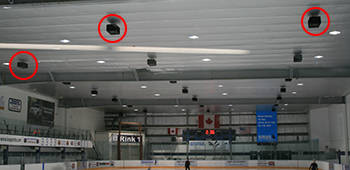
This arena’s 27 speakers hanging over the ice are all installed without proper flying hardware or support. They are at risk of falling.

This arena has 27 speakers hanging over the ice surface. The speaker cabinets are made of carpet-covered particleboard. Over time, the particleboard absorbs moisture, weakening the cabinets. The contractor-installed eyebolts into the back of the speakers, which were never designed to be hung by their backs.

We contacted Peavey, the manufacturer of these speakers, and they had the following advice:

“Thanks for notifying us [Peavey, the speaker manufacturer] of this. That particular cabinet does not come equipped with flying hardware. That is enough indication this cabinet it should not be “flown.”  No flying hardware option was included on this Peavey cabinet.”

No fly zone example #2

unsafe speakers 3a
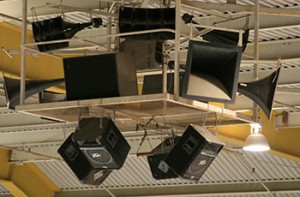
These speakers weigh 25.5kg (56 pounds) each and are defying gravity by being improperly hung over a school gym.

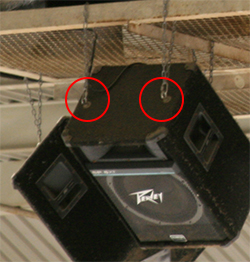
unsafe speakers 3b An arena has twelve speakers flown over the gym floor. Again, the contractor put eye bolts in the top of the bottom four speakers and flew the speakers with chain rather than proper flying hardware.
Again, we contacted the manufacturer, and they had this to say:

“Those look like [Peavey] SP5 enclosures. That model is not designed or braced from the factory for overhead suspension. Any modification done by the installer would not be approved or recommend by Peavey Electronics… I recommend that you have them inspected immediately by a qualified structural engineer and/or taken down. That is a very dangerous and foolish practice, and the installer as well as the facility will likely face a significant liability if someone is injured (or worse!). I am surprised their insurance company lets them get away with it.”

There is nothing wrong with these speakers if they are used on a tripod stand or sitting on a gym stage floor. They simply shouldn’t be flown over spectators or an ice surface.

No fly zone example #3: Don’t sit under this

Restaurant unsafe speakers

Checked out a new restaurant downtown recently and the hostess asked where I’d like to sit. “Not under a speaker,” was my answer. Why? The pressboard consumer bookshelf speakers mounted on the wall are not designed to be hung, and over time the pressboard cabinets will expand, letting go of the bracket.

Rat’s nest installations

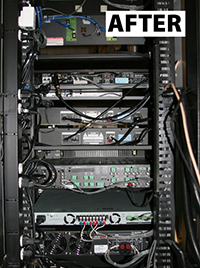
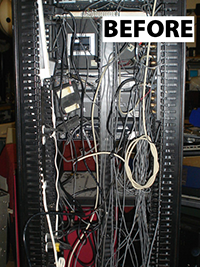
rack-afterrack beforeMany times the incorrect sound equipment is installed for the application at hand, and the quality of the installation leaves a lot to be desired. This is a sound system rack before and after, found in a B.C. recreation centre.
Untidy is an understatement! Equipment was stuck to the side of the rack with double-sided tape and hanging by its wires. The fluorescent light to the top left of the picture was also stuck on with double-sided tape, and was hanging by the power cord.

A messy rack makes for not only a poor installation quality, but any tech not familiar with the installation will need to spend extra time on-site when it comes time for any sort of service, and failures can happen if a wire is snagged during equipment removal, causing problems.

pool speaker
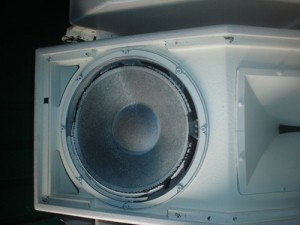
This speaker lasted only a few years in a harsh pool environment.

Wrong equipment for the job
This customer was concerned about poor sound quality. Once we pulled the grilles off the speakers, the cause was obvious: the speakers
installed in the pool were not designed for the corrosive chlorine environment, and a few short years after they were installed the speakers were literally falling apart around the edges. Any speaker that is properly chosen and installed should last 20-30 years at minimum, not the eight years that this one lasted.

Choosing a reputable sound contractor

When choosing a sound company, there are several ways to ensure you’re getting a good installation:

  • Referrals and references: Talk to owners or managers of similar venues to ensure that their recent sound system is a step up from their old sound system. Many times, a new sound system can actually sound worse than one that has been installed for years if not installed correctly. The quality of your overall sound will depend largely on the design of the sound system and how it is set up and calibrated, and not because it’s a new model. A good installation takes facility construction such as reverberant environments (“echo-y”) typical of arenas, gyms ,or pools into consideration and overcomes those challenges with a system that sounds great.
  • Service: Has your sound contractor taken care of little (or big) problems as they arise?
  • Low voltage permit: It is mandatory with new construction for a sound contractor to pull a low voltage permit to install the microphone and speaker wiring. Is your sound contractor able to pull his own permit, or does he have to get an electrical contractor to pull the permit for him?
  • Business license, insurance and bonding: A qualified contractor will be able to pull a business license in the city that he’s doing work in, has liability insurance, and can be bonded if required.

A properly designed and installed sound system, regardless of the type of venue, should last 10-15 years with a minimum of service calls. A sound system that has multiple people using it should stand up to a certain amount of abuse without blowing amplifiers or speakers, and of course any installation should be without any risk of falling speakers or shock hazard to the users or the general public.

Have questions about your sound system installation? We’d be happy to answer any questions or concerns you might have.

We can fix that

Sound Solutions offers a control and volume panel rebuilding service, on an exchange basis, at a fraction of the cost of a new control.

Continue reading

Finance your next system with a lease

Sometimes the sound system you need isn’t the sound system your budget allows. A commercial lease might be the answer for you: Spread the cost over equal monthly payments and at the end of the term you can purchase the equipment for 10 per cent of the original cost, trade up for newer equipment, or return the equipment. It’s that easy.

Sound Solutions has partnered with Pemberton Leasing, a locally owned and operated lease underwriting firm which has been providing lease financing to businesses since 1987.

Ask us about leasing your next A/V system.

Simple control with Rane HAL digital signal processor

ranelogoRane HAL digital signal processor gives you simple control over your entire audio system 

Imagine making the operation of a complex, multi-zone sound system so simple that anyone can operate it. That is exactly what the HAL line of digital signal processors by Rane can achieve.

Rane digital remote
The DR3 wallplate lets you easily control how and where the sound goes, no matter how complex your system

Rane digital signal processors are reliable and come with ground-breaking backend programming that lets you connect all your audio and video sources, with the capability of control from a wallplate, smartphone or tablet.

See and hear how well it works. Get in touch with us to arrange a Rane demo.


Welcome to Sound Advice

[et_pb_section admin_label=”section” fullwidth=”on” specialty=”off”][et_pb_fullwidth_header admin_label=”Fullwidth Header” title=”Welcome to Sound Advice” subhead=”We’ll be adding a lot of information here to help you troubleshoot audio and video system.” background_layout=”light” text_orientation=”left” header_fullscreen=”off” header_scroll_down=”off” background_url=”http://www.soundsolutionscanada.com/wp-content/uploads/2015/08/audio-529276.jpg” parallax=”on” parallax_method=”off” content_orientation=”center” image_orientation=”center” custom_button_one=”off” button_one_letter_spacing=”0″ button_one_use_icon=”default” button_one_icon_placement=”right” button_one_on_hover=”on” button_one_letter_spacing_hover=”0″ custom_button_two=”off” button_two_letter_spacing=”0″ button_two_use_icon=”default” button_two_icon_placement=”right” button_two_on_hover=”on” button_two_letter_spacing_hover=”0″ button_one_text_size=”20″ button_one_border_width=”2″ button_one_border_radius=”3″ button_one_border_radius_hover=”3″ button_two_text_size=”20″ button_two_border_width=”2″ button_two_border_radius=”3″ button_two_border_radius_hover=”3″] [/et_pb_fullwidth_header][/et_pb_section][et_pb_section admin_label=”section”][et_pb_row admin_label=”row”][et_pb_column type=”2_3″][et_pb_text admin_label=”Text” background_layout=”light” text_orientation=”left” use_border_color=”off” border_color=”#ffffff” border_style=”solid” text_font_size=”14″]

SoundSolutions-37
Curt doing what he loves

By Curt Palme, Owner, Sound Solutions

A love of electronics is wired directly into my brain. I mean that figuratively, of course, but I wouldn’t be surprised if one day doctors discovered a web of wires and cables in my head. I’ve been drawn to electronics since I was a toddler, and recall being fascinated with my parents’ reel-to-reel player at a time most little boys are fascinated with trucks and fire engines. I’ve always wanted to know what’s inside anything electronic and started taking apart electronics and small appliances before I started kindergarten, probably to my mom’s dismay.

I am one of those people that doesn’t work for a living, because I love what I do. It’s not work; it’s fun. Designing and installing audio and video systems is pure exhilaration. Give me an amplifier that isn’t working right and I’m in heaven: the challenge of finding the problem and then making it right is a highlight of a work day.

Over the decades I’ve shared my knowledge with my customers. Most people don’t understand how their sound systems work, never mind what all the buttons and knobs do. It’s our mission at Sound Solutions to design systems that ARE easy to use, so anyone — even someone with zero knowledge of the system – can make the basic adjustments without breaking something. We also ensure our customers understand some basic background to their audio system.

We call these the “30 Second Tech Lesson.”

Sound Advice is where you can find 30 second tech lessons on a variety of audio, video and sound system issues. Watch this space for tips, tricks, how-to videos and the latest news on industry trends.

Sign up for our Sound Advice newsletter for monthly tips, as well as specials and industry news. Follow us on Twitter [[link]] and Like us on Facebook. We’ll keep you informed without overwhelming you.

[et_bloom_locked optin_id=optin_1][/et_bloom_locked]


[/et_pb_text][/et_pb_column][et_pb_column type=”1_3″][et_pb_image admin_label=”Image” show_in_lightbox=”off” url_new_window=”off” animation=”left” sticky=”off” align=”left” force_fullwidth=”off” always_center_on_mobile=”on” use_border_color=”off” border_color=”#ffffff” border_style=”solid”] [/et_pb_image][/et_pb_column][/et_pb_row][/et_pb_section]